 DynaGuard
Your AI agents work. You stay in charge.
The DCT-A Companion lets any AI agent pay invoices, write to clients or update records, within rules you set, with every important step approved on your phone.
Works with Claude, ChatGPT, Copilot, Gemini and any agent you build.
What you type
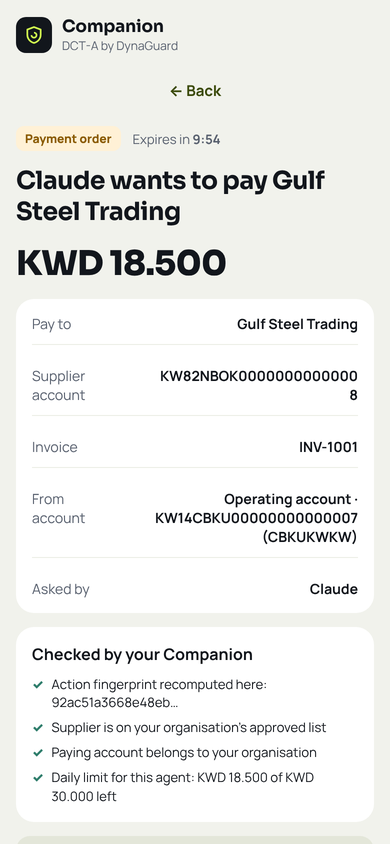
Pay invoice INV-1001 from Gulf Steel TradingSUPPLIER-1 to account KW82 NBOK 0000 0000 0000 08ACCOUNT-2, and email the receipt to Mona Al-RashedPERSON-2 at mona@cedar.exampleEMAIL-3.
Five promises the Companion keeps
You decide
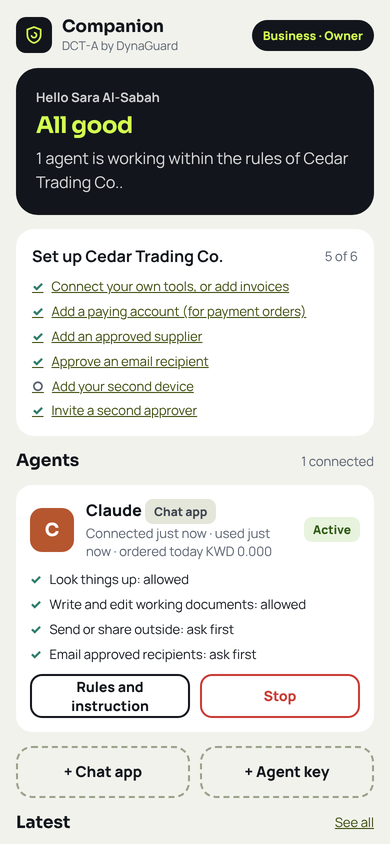
Each agent gets written rules for every kind of action: what it may do at once, what needs your approval, and what it may never do. Agents cannot change their own rules.
You approve what matters
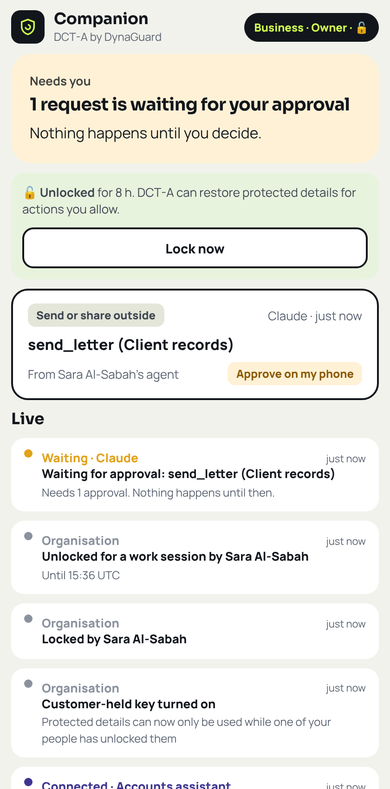
Payments, emails, filings, decisions and changes to important records wait for a person. You see exactly what will happen and confirm with your face or fingerprint, on your phone.
Your details stay yours
The AI sees tokens like SUPPLIER-1 instead of names, accounts and addresses. Real details are restored only inside your organisation's DCT-A, at the moment of an allowed action.
Everything is proven
Every authority, approval and action is signed with post-quantum cryptography. Download a signed proof of any decision for your auditors.
One tap stops everything
Stop one agent, all of yours, or every agent in the organisation. Authority ends at once and anything waiting is cancelled.
Up and running in ten minutes
Create your organisation
Open the Companion on your phone with your invitation code. Choose personal, business or bank, your country and currency, and create your passkey.
Connect your AI
Add the DCT-A connector in your AI app, or create an agent key for your own agents. Choose what each one may do.
Approve on your phone
Ask in plain words. Look-ups happen at once; anything important waits for your approval, then DCT-A carries it out and keeps the proof.
For every organisation and profession
Connect your own systems, such as case files, patient records, claims or customer records, and decide how each tool may be used.
Maker-checker built in: whoever connects an agent can never approve its requests.
Accounts payable and customer communication, with a second person for every new supplier.
Claims look-ups at once; settlements only after an adjuster approves.
Case files and client letters; every court filing waits for a lawyer.
Patient details protected from the AI company, with your organisation's own key.
Bills, paperwork and emails handled by your assistant, approved from your phone.
Built so that nobody acts alone
Not the AI, not a stolen laptop, and not a single insider.
Post-quantum signatures
Rules, authorities and approvals are signed with ML-DSA-65, the new United States standard designed to resist future quantum computers.
Fifteen-minute authority
Agents never hold lasting power. Each short authority is rebuilt from your signed rules and checked against your own records.
Sealed limits
Agents never learn your limits, approved suppliers or recipients, and every refusal looks the same to them.
Your own key
Seal protected details to a key only your organisation holds (ML-KEM-768). While it is locked, our servers cannot read them.
Separation of duties
Four-eyes for bank details, two approvals for large payments and record changes, and approvals limited to your phone.
Tested before every release
Every release passes end-to-end tests in real browsers and a security review with exploit tests before it ships.
What the Companion does not do: it never moves money. An approved payment becomes a signed payment order (an ISO 20022 bank file and a PDF) that your bank or finance team executes.
For developers
Any framework works: LangChain, CrewAI, AutoGen, the OpenAI or Claude agent tools, or plain code. Create an agent key in the Companion, then call tools through MCP (Model Context Protocol) or REST. A lead agent can start helper agents with the same or narrower rules.
# 1. get a 5-minute token
curl -s https://connect.dynaguard.ai/oauth/token \
  -d grant_type=client_credentials \
  -d client_id=$ID -d client_secret=$SECRET

# 2. call a tool
curl -s https://connect.dynaguard.ai/v1/tools/pay_invoice \
  -H "Authorization: Bearer $TOKEN" \
  -d '{"invoice":"INV-1001","amount":"18.500"}'

# answer: APPROVAL_REQUIRED, waiting on the owner's phone
Join the pilot
We are inviting a small number of organisations to use the Companion with their own agents. You get an invitation code, the user manual and direct support from our team.